
Callie Pro for iPad
The Gap Between Calculation and Exploration
For most people, a calculator is a utility of convenience. It handles the quick arithmetic of daily life: splitting a bill, checking a percentage, or running a simple conversion. But there is a meaningful difference between calculating and exploring. Once the work expands into symbolic algebra, matrices, statistics, complex analysis, programmable workflows, or three-dimensional visualization, a standard calculator quickly reaches its limit.
We believe the iPad is an ideal form factor for that middle ground. It combines the portability and direct interaction of a tablet with enough screen space to keep equations, graphs, controls, tables, and results together. That is why we built Callie Pro: a focused mathematical workspace designed specifically around advanced work on iPad.
Callie Pro is available on the U.S. App Store for a one-time purchase of $12.99. It requires iPadOS 16 or later, does not require an account, and is designed to keep mathematical work on the device.
A Calculator-Style Interface Built for Focus
Professional software often hides capable tools behind layers of menus, disconnected panels, and mode changes. Callie Pro takes a different approach. Its graphing and work areas sit above a fixed calculator shell, keeping the primary controls available while you calculate, graph, trace, edit, analyze, and export.
The main workflow places tools such as Y=, GRAPH, TABLE, WINDOW, and TRACE close at hand. Dedicated workspaces provide access to CAS, Matrix, Stats, Python, and the searchable Catalog. The goal is not to imitate a desktop application on a smaller screen. It is to make the iPad feel like a coherent mathematical instrument.
Because the graph, keypad, tables, symbolic tools, and analysis controls remain part of the same workspace, users can move between an equation and its visual or numerical behavior without constantly leaving the task at hand.
Symbolic Mathematics and a Local Python Workspace
Callie Pro includes a Computer Algebra System for exact symbolic work. It supports operations such as:
- Simplify, factor, and expand algebraic expressions.
- Solve and numerically solve equations.
- Differentiate and integrate expressions.
- Evaluate limits and Taylor series for deeper calculus workflows.
When a formula is no longer enough, the local Python workspace supports numerical experiments, matrices, statistics, complex arithmetic, simulations, and custom calculator-style workflows. The Python environment is intentionally math-focused: it does not provide internet access, package installation, unrestricted file browsing, or subprocess execution.
This keeps the workspace useful for programming and experimentation without turning Callie Pro into a general-purpose development environment. Scripts and calculations run locally rather than being sent to a remote service.
Advanced Graphing in 2D, 3D, and the Complex Plane
Callie Pro combines several graphing systems in one workspace:
- Standard function graphs
- Parametric graphs
- Polar graphs
- Complex-plane visualization
- Three-dimensional surfaces
- Complex 3D surfaces
- Temporal graphing
Built-in Graph, Table, Window, Trace, Analysis, and Zoom tools make it possible to move between symbolic definitions, visual behavior, and numerical values without rebuilding the problem in another app.
Complex Analysis, Visualized
Complex 3D Surface mode turns a complex function into an interactive height surface over the complex plane. A function can be visualized using its real component, imaginary component, magnitude, or argument.
This makes it possible to inspect roots, poles, singularities, logarithms, branch behavior, rational functions, and complex transformations spatially rather than treating them only as symbolic expressions. Complex 2D paths and trace tools complement the surface view when a more direct reading of the complex plane is needed.
Temporal Mode: Mathematics in Motion
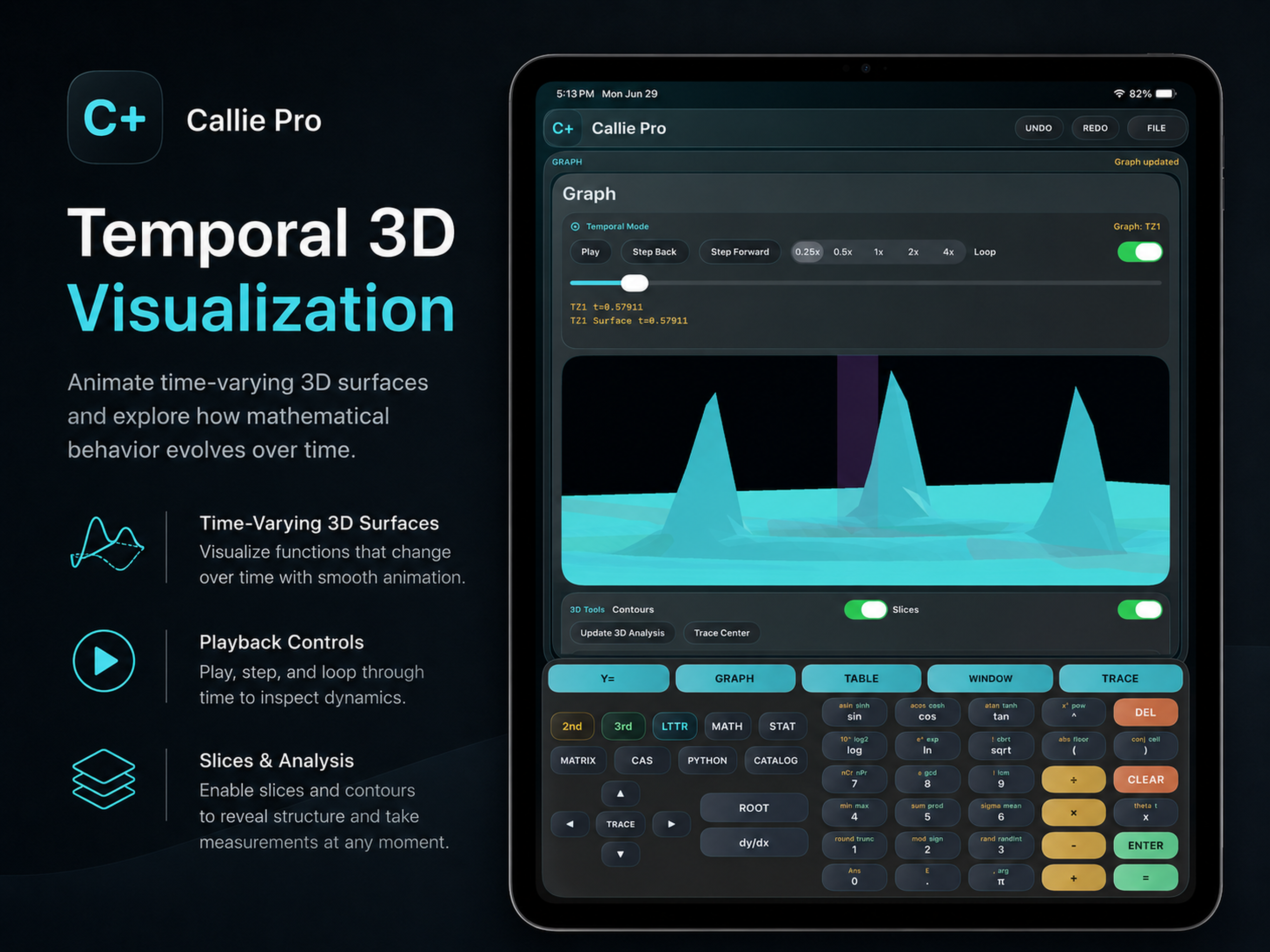
Many mathematical systems are easier to understand when time is treated as a parameter rather than represented by a single static frame. Callie Pro's Temporal Mode allows supported graphs to evolve over time.
You can play, pause, step through, and loop temporal functions, parametric paths, polar graphs, complex paths, and 3D surfaces. This is useful for examining changing systems, animated fields, oscillations, trajectories, and models whose behavior only becomes clear through motion.
Temporal Mode is not a decorative animation layer. It is an exploration tool that lets users stop at a moment, inspect the graph, advance frame by frame, and compare how the system changes.
Matrix and Statistics Workspaces
Callie Pro includes dedicated tools for linear algebra and data analysis.
Matrix tools support matrices up to 8 by 8 and include:
- Determinant
- Inverse
- Reduced Row Echelon Form (RREF)
- Rank
- Trace
- Transpose
- Eigenvalues
- Solving systems in the form Ax=b
Statistics tools include descriptive statistics, regression, residual analysis, confidence intervals, hypothesis testing, normal-distribution tools, inverse distributions, one-way ANOVA, and CSV export.
These workspaces are designed for direct use rather than being reduced to a collection of isolated example buttons. Results remain close to the rest of the mathematical workflow, making it easier to move from data to analysis and from analysis to graphing.
Functions, Constants, and Engineering Reference
A searchable Catalog provides mathematical functions, worked examples, engineering references, and scientific constants. Constants can be inserted directly into expressions or copied in symbolic or numerical form.
This makes Callie Pro useful not only for coursework, but also for engineering, physics, numerical modeling, and other situations where reliable reference values need to remain close to the calculation.
Exporting Work
Callie Pro supports export workflows for moving results into reports, notes, coursework, research, and documentation. Graph work can be exported as PDF or SVG, while statistics data can be exported as CSV. Results can also be copied throughout the app for use in other documents and workflows.
Why Callie Pro Is Separate from Callie
Callie Pro is a separate app from Callie, our everyday calculator and utility workspace.
Callie is built for the quick calculations that appear throughout the day: arithmetic, scientific functions, money tools, unit conversion, currency conversion, percentage math, and date tools. Callie Pro is designed for longer sessions involving graphing, symbolic computation, programming, matrices, statistics, complex analysis, and scientific visualization.
Keeping the two products separate allows each to remain focused. The everyday app stays fast and approachable, while Callie Pro can provide a denser, professional workspace without forcing that complexity into a general-purpose calculator.
Local-First by Design
Callie Pro does not require an account, and the App Store privacy listing states that the app does not collect user data. Its Python workspace is local and deliberately excludes network access. This means equations, scripts, graphs, and analysis can remain part of an offline, device-based workflow.
Callie Pro is also sold as a one-time purchase rather than a subscription. The value is in the instrument itself: a native mathematical workspace that remains available without an ongoing service relationship.
Built for Students, Engineers, Educators, and Professionals
Callie Pro is intended for people who need to do more than obtain a final answer. It is built for studying calculus, solving engineering problems, exploring complex analysis, teaching mathematics, working with matrices and statistics, building numerical models, and examining how mathematical systems behave.
Graph it. Trace it. Animate it. Script it. Callie Pro brings advanced graphing, symbolic mathematics, Python, data analysis, and scientific visualization into one focused iPad workspace.
Callie Pro: Graphing & CAS is available now for iPad for $12.99 in the U.S. App Store. Regional pricing and taxes are determined by Apple.
View Callie Pro on the App Store
Explore Callie Pro
Read the Callie Pro User Guide